The Inverter’s Place in the Solar Story
Understand the inverter’s place in a solar system, distinguish its role from batteries and optimisers, and read household solar monitoring with more confidence.
The common mistake is to treat an inverter as a box that simply makes a solar system work. In fact, its controls shape how the system responds to changing conditions, communicates with other equipment and reports what is happening; misunderstanding those functions can make a display or system diagram needlessly confusing. Knowing the inverter’s place in a solar system helps you ask sharper questions about what the equipment actually does.
Control the hand-offs
Once the panels supply electrical output, the inverter manages the hand-off to the home’s electrical system. Depending on the design, it may also coordinate with a battery, monitor operating conditions or communicate with a monitoring service. The exact combination varies, so the model name alone does not tell the whole story.
Think of the inverter as a system coordinator as well as a conversion point. It works within limits set by the panels, wiring, other equipment and its own configuration; it cannot correct every issue elsewhere in the installation.
Separate system roles
Several components may appear together in an equipment list, but their roles differ. An inverter manages the system’s electrical operation; a battery stores energy for later use; and a power optimiser conditions output at panel level while a separate inverter may still handle the main conversion.
Monitoring equipment and apps add another layer. They display information gathered from the system, but a screen is not itself a control device, and the labels or available views depend on the product and installation.
Compare inverter layouts
A string inverter serves a group of panels and provides a central point for system conversion and monitoring. Microinverters sit at individual panels, creating multiple conversion points; some products provide panel-level information, though monitoring features vary.
Power optimisers are different: they work with panel output but are generally paired with a central inverter. Roof layout, shade, compatibility and the installer’s design all affect which arrangement makes sense. Ask what each component does in the proposed system rather than judging by its label alone.
Read system signals
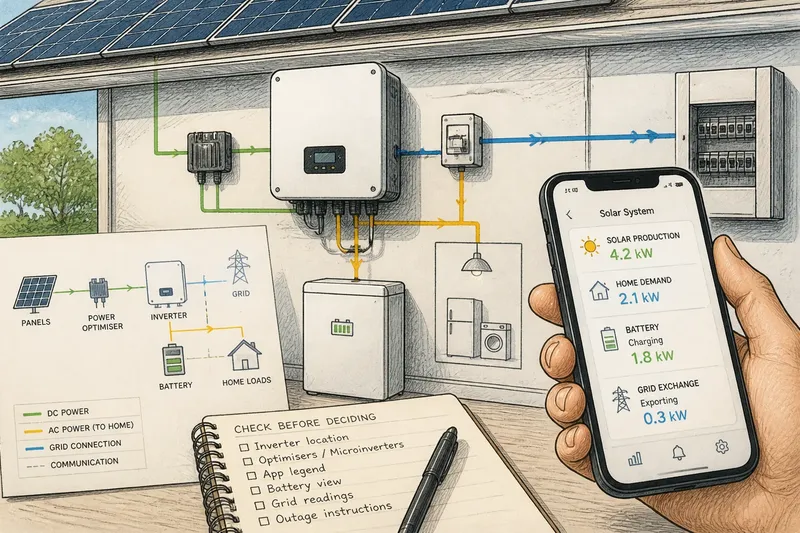
An app may show solar production, household demand, battery activity or grid exchange as separate readings. One figure cannot automatically stand in for another, and some systems do not show every category in the same place.
Imagine you are reviewing an invented system diagram that lists a central inverter, a battery and a home-energy app. First, match each item to its stated role: the inverter manages system operation, the battery stores energy, and the app presents selected information. Then check the app’s legend and documentation for which readings it actually displays; if household demand is absent, do not infer it from the solar-production figure, but ask the installer how that information can be viewed.
Keep the equipment manual and commissioning documents together, and use their names for the readings when asking for help.
Questions about inverters?
What does a solar inverter do?
It manages the system’s electrical operation and provides the relevant hand-off between the array and the home’s electrical system. Its other functions depend on the equipment and configuration.
Is a power optimiser the same as an inverter?
No. An optimiser works with panel output, while a separate central inverter may perform the main conversion. Check the system diagram to see where each component sits.
Does an inverter app show household use?
Not necessarily. An app may show production alone or include other readings, such as household demand, battery activity or grid exchange; check its legend and product documentation.
Will a solar system operate during a grid outage?
Do not assume it will. Operation depends on the system design, controls and any backup equipment, so consult the documentation or a qualified installer rather than changing settings yourself.
Check before deciding
- Equipment list: If it names a central inverter, identify its location in the diagram; if it does not, ask the installer to identify the conversion equipment.
- Panel devices: If the list includes microinverters, ask whether monitoring is available per panel; if it lists optimisers instead, confirm which central inverter they work with.
- App legend: If a reading is labelled as production, treat it as production; if the label is unclear, check the manual before using it as a household-use figure.
- Battery view: If charging and discharge appear as separate readings, use those labels to distinguish storage activity; if they do not, ask where battery status is displayed.
- Grid readings: If import and export are shown separately, read them as distinct flows; if only one grid figure appears, consult the app guide before deciding what it represents.
- Outage instructions: If the manual describes backup operation, follow its stated conditions; if it does not, contact a qualified installer and do not assume the system will supply the home.
These checks clarify what the system reports, not whether it has a fault. For operation or safety questions, follow the manufacturer’s instructions and speak with a qualified solar professional.
Keep the roles distinct
When a system screen says it is producing or using power, check which component or flow the label describes. The inverter’s place in a solar system is easiest to understand by tracing what it manages, what other equipment contributes and what the monitoring actually reports.
Keep the equipment diagram beside the app guide; matching component names to displayed readings is often the quickest way to turn an unfamiliar system into a legible one.